


EarnIn: Why Wait for Payday?
4.8140.54K Reviews
App Specs
- Version
- 16.57
- Updated On
- License
- Free
- Downloads
- 10,000,000+
- Developer
- Activehours Inc.
- Categories
- Finance
- Platform
- Android, iOS
Screenshots
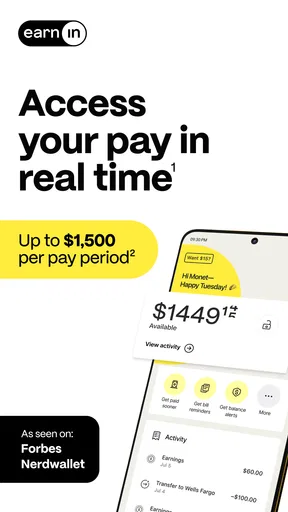
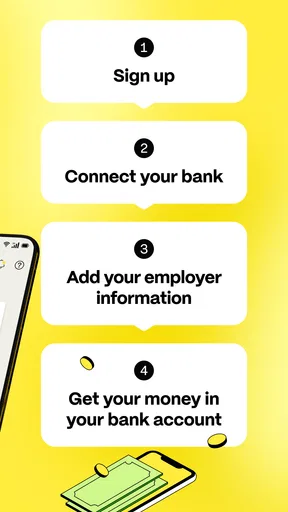
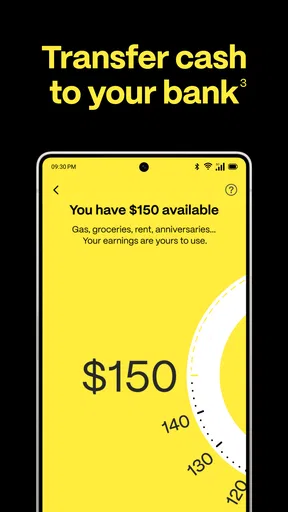
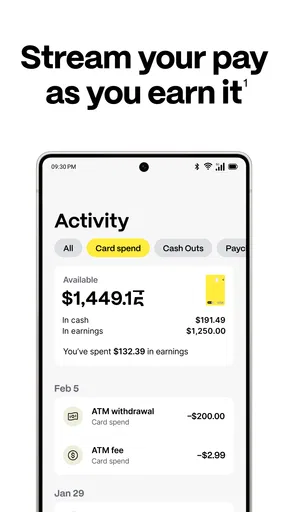
 Analysis by AppCompare
I’ve found that the most important question with EarnIn isn’t simply how early I can access money; it’s whether the app fits the way I’m paid and the way I manage cash flow. Getting wages sooner can help with a badly timed bill, but it doesn’t increase what I earn. I’d treat it as a way to move money between days, not as extra income or a substitute for a budget.
Where people can get stuck
The first friction point is usually connecting the app’s view of your work and pay with your actual routine. A fixed schedule is easier to make sense of than shifts that change, overtime, or work split across several locations. If the information in your account doesn’t reflect when you worked, the amount shown as available may not match what you expected. I’d check the work and pay details carefully before relying on a particular cash-out amount.
Bank access is another practical dependency. A connection that needs attention, a changed bank account, or a mismatch between the account you use for pay and the one you expect to receive money in can interrupt the process. That doesn’t necessarily mean your wages or account are wrong; it means there’s a link in the workflow that needs checking. I’d avoid planning an urgent payment around a transfer until I can see the relevant details in the app.
It also helps to separate two questions that are easy to blur together: how much you have earned and how much you can access now. The app’s early-payday purpose is to make a portion available ahead of payday, but that is not the same as having your full paycheck early. I’d make a plan based on the amount actually shown to me, rather than treating a daily maximum as a promise of what I personally can withdraw.
Checks I’d make before depending on it
When setting up, I’d enter employment and bank details carefully and make sure the account reflects how I’m paid. If I’ve recently changed jobs, banks, or work patterns, I’d take extra time to review what’s on file instead of assuming an older setup still applies. Those small checks are more useful than repeatedly trying a cash-out when the underlying account information may be out of date.
I’d also decide in advance what problem I’m trying to solve. Covering a bill that falls a few days before payday is different from using early access every week to make ordinary spending work. In the first case, a one-off bridge may be useful. In the second, it may be a sign that the regular budget needs attention, because taking part of a paycheck sooner leaves less to arrive on payday.
Recovering a disrupted workflow
If something doesn’t work, I’d go step by step rather than making repeated attempts. First, check that I’m using the right bank account and that my employment details still match my current situation. Then review the app’s current account information and any messages it displays, and make sure the phone’s connection is stable. If the issue remains, I’d use the app’s own support route rather than guessing at workarounds or sharing sensitive account details elsewhere.
Worth Reading Before You Choose

Flipboard Shows What News Apps Must Do Beyond the Feed

Switching to Android Auto Means Rethinking Your Driving Routine

Google Calendar Makes a Crowded Week Easier to Manage

Ludo King Makes the Most of the Minutes Between Plans

Baby Panda World Brings Quick Play to Modern Phones, but Its Game Library Feels Busy

ESPN’s Live Game View Makes Following Close Games Easier
For a time-sensitive expense, I’d keep a backup plan while sorting it out. That could mean contacting the biller to ask about timing or using savings I had already set aside, rather than assuming an early cash-out will arrive at a particular moment. This is especially sensible if the expense has a firm deadline: convenience is valuable, but a payment tool should not be the only part of the plan.
When the app may not be the cause
A delay or an unexpected available amount can be frustrating, but it doesn’t automatically point to a fault in the app. Work hours, payroll timing, bank information, and the timing of a transaction all affect the broader path from earnings to usable money. I’d check those pieces one at a time and avoid making the same request repeatedly while I’m unsure what has happened.
I’d also compare the app’s timing with the actual deadline I need to meet. If rent, a utility bill, or another payment is due immediately, early access may not be the right tool unless I can see that the money is available in time. For planned expenses, setting money aside before the due date is more predictable; for a short gap, EarnIn can be a useful option if the account setup and available earnings line up.
A practical verdict
EarnIn is a finance app from Activehours Inc. that is free to download, and its central appeal is straightforward: it can make some earned wages available before the normal payday. The current version is 16.45, and the app is listed for devices running Android 8.0 or later. Its age rating is Everyone. A 4.7 average from around 294,000 ratings and over 10 million installs suggest that many people have tried it, though popularity doesn’t guarantee that it suits every pay schedule or cash-flow problem.
The key limit to keep in mind is the actual access cap: the app’s current description says up to $150 a day, with a maximum of $1,000 per pay period. Those are ceilings, not amounts every user should expect to receive. I’d check what is available in my own account and remember that cashing out early reduces what remains for payday. That simple mental accounting is the difference between using the app deliberately and treating it like a raise.
Ever found yourself counting the days until payday, wishing you had a bit of your paycheck earlier? Well, that's where EarnIn steps in. I recently stumbled upon this app, and let me tell you, it’s like a breath of fresh air for managing finances between paychecks.
What is EarnIn and How Does It Work?
So, let's get right into it! EarnIn is an app that allows you to access a portion of your earned wages before your actual payday. It’s like having a part of your paycheck on-demand, without the need for high-interest payday loans or credit card debt. The app tracks your work hours and based on that, lets you withdraw a portion of your earnings.
The process is pretty straightforward. You connect your bank account to the app, and it uses your work schedule and timesheets to calculate how much money you’ve earned. You can then choose to cash out up to $100 a day and $500 per pay period. The best part? There’s no interest or fees. Instead, you can tip whatever amount you feel is fair. Now, that's a unique approach, isn't it?
Setting Up the App
Getting started with EarnIn is a breeze. After downloading the app from the Google Play Store or Apple App Store, you’ll need to set up your account. This involves entering your bank details and providing information about your job. The app needs this info to track your work hours accurately. It might sound a bit intrusive, but rest assured, EarnIn prioritizes your privacy and security.
Once everything is set up, you can start cashing out your earnings. The app also offers features like Balance Shield, which is designed to prevent overdrafts by notifying you when your bank balance is low. It’s like having a financial buddy watching your back!
User Experience and Interface
The app’s design is sleek and user-friendly. Navigating through the different sections is a breeze. Whether you’re checking your available earnings or setting up notifications, everything is just a tap away. The app also integrates smoothly with most banks, ensuring that transactions are seamless and quick.
One thing I particularly appreciate is the transparency. EarnIn keeps you informed every step of the way, so there are no surprises. The app even provides insights into your spending habits, helping you make smarter financial decisions.
Who Can Benefit from EarnIn?
If you’re someone who lives paycheck to paycheck, or if unexpected expenses often throw your budget off balance, EarnIn could be a lifesaver. It’s perfect for those times when you need a little extra cash to cover bills or emergencies without resorting to high-interest loans.
However, it’s important to use the app responsibly. While it’s tempting to cash out frequently, remember that this is still your hard-earned money. Using it wisely ensures you’re not left in a financial pinch come payday.
Features Worth Highlighting
- Balance Shield: Protects you from overdraft fees by sending alerts when your bank balance is low.
- Cash Out: Withdraw up to $100 per day based on your earned wages.
- Health Aid: A feature that helps you cover medical costs by allowing you to cash out more when needed.
- Daily Tips: You decide how much to tip for the service, adding a personal touch to your financial management.
Final Thoughts
Overall, EarnIn is a fantastic tool for those who need a little financial cushion between paychecks. It’s easy to use, transparent, and most importantly, it doesn’t trap you in a cycle of debt. I’d definitely recommend giving it a try if you find yourself needing early access to your paycheck.
It’s refreshing to see an app that prioritizes user needs over profit, providing a service that genuinely helps manage finances better. So, if you're tired of waiting for payday, why not give EarnIn a shot? You might just find it’s the financial companion you’ve been looking for.
Pros
- Easy access to earned wages.
- No hidden fees or interest.
- User-friendly interface.
- Helps avoid overdraft fees.
- Instant transfers available.
Cons
- Limited to certain employers.
- Requires bank account access.
- Daily withdrawal limits apply.
- Not a budgeting tool.
- Some features need a subscription.
FAQs for EarnIn: Why Wait for Payday?
What is EarnIn and how does it work?
EarnIn is a financial app that allows users to access a portion of their earned wages before their scheduled payday. By connecting the app to your bank account and tracking your work hours, EarnIn calculates your earnings and lets you cash out up to $100 per day, with a maximum of $500 per pay period. The app also offers features like Balance Shield to prevent overdrafts.
Is EarnIn safe to use with my bank account?
Yes, EarnIn is designed with security in mind. It uses bank-level encryption to protect your data and personal information. The app requires read-only access to your bank statements and does not store your login credentials. Users should always ensure they are downloading the official app to avoid phishing scams.
Are there any fees associated with using EarnIn?
EarnIn does not charge mandatory fees or interest. It operates on a tip-based model, where users can choose to tip any amount they feel is fair for the service. Tips are optional and can be adjusted per transaction. This makes it a cost-effective alternative to payday loans or overdraft fees.
What are the eligibility requirements to use EarnIn?
To use EarnIn, you need to have a regular paycheck, a checking account, and a smartphone. You'll also need to submit your work hours through timesheets or have your work location verified via GPS. The app is best suited for hourly, salaried, and gig workers who receive regular payments via direct deposit.
How quickly can I access my funds with EarnIn?
Funds from EarnIn can typically be accessed within minutes if you use the Lightning Speed option, which requires a small fee. Otherwise, it generally takes one to two business days for the cash out to reflect in your bank account. Transfers may vary slightly depending on your bank's processing times.


